CMP 170HX Documentation
Documentation for the NVIDIA CMP 170HX, a GA100 mining card. This site covers the hardware, cooling, power, the Linux unlock, and decode numbers from one unlocked 64 GiB card.
What is the CMP 170HX?
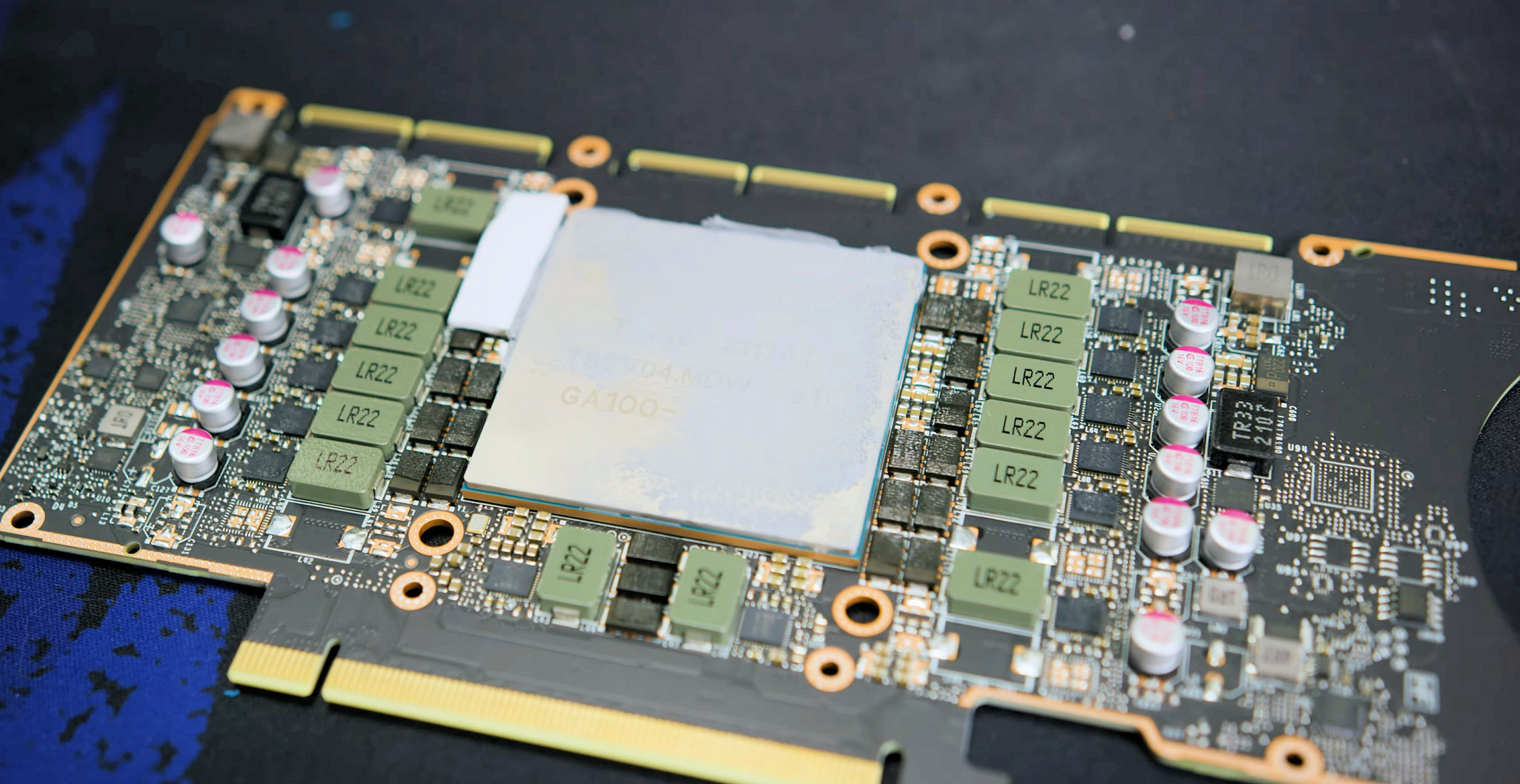
The CMP 170HX is an NVIDIA-built Cryptocurrency Mining Processor card from 2021. Under the heatsink sits the same GA100 silicon family as the A100 datacenter GPU. NVIDIA sold it as Ethereum mining hardware with compute, memory geometry, and PCIe deliberately clamped. The PCB matches the A100 40GB PCIe reference designators closely enough that A100 schematics and waterblocks map onto it.
Two production SKUs show up in the wild:
| SKU (stock) | PCI ID | Subsystem | Die | Unlocked HBM | Bus | Bandwidth (approx.) |
|---|---|---|---|---|---|---|
| 8 GB | 0x20C2 |
0x1585 |
GA100-105F-A1 | 64 GB | 4096-bit | ~1.49 TB/s |
| 10 GB | 0x2082 |
0x1557 |
GA100-105A-A1 | 40 GB | 5120-bit | ~1.56 TB/s |
- Compute (Full Specs, both SKUs): 70 SM / 4480 CUDA / 280 tensor
- Clocks: base 1140 MHz, boost 1410 MHz
- Power: default TDP 250 W, software max around 300 W, idle roughly 30–40 W
- APIs: CUDA Compute Capability 8.0, OpenCL
- Display / graphics: no display outputs; no DirectX / Vulkan / OpenGL / NVENC path
Community unlock tooling (cmpunlocker) restores memory geometry, lifts the FP32 FMA throttle, and enables PCIe Gen2 in software. Hardware lane width still needs the PCIe capacitor mod if you want Gen1 x16 (~4 GB/s) instead of stock Gen1 x4 (~1 GB/s).
Lab headline (unlocked 64 GiB): Nemotron-3.5-Lightning-30B-A3B W4A16 at 228 tok/s (16k coding), batch 1,306 tok/s aggregate at 32k×16, and 79% decode retained at 128k versus 1k. Earlier Qwen3.8-27B DFlash ~212 tok/s is still in the matrix. Full tables: Performance Overview.
Primary community sources: hardware & mod docs and the GitHub mirror. Deep unlock reference: Consensus-Protocol/cmp170hx. See also Community.
Key specifications (at a glance)
- Architecture: Ampere GA100 (TSMC 7 nm), ~54.2 billion transistors, 826 mm² die
- Memory: HBM2e; stock 8 GB or 10 GB; unlocked 64 GB (8 GB SKU) or 40 GB (10 GB SKU)
- Stock PCIe: Gen1 x4 (~1 GB/s) via firmware Gen lock plus missing AC coupling caps on 12 of 16 lanes
- Power: 1× 8-pin CPU/EPS-style connector via adapter
- Cooling: Passive server heatsink; needs strong airflow or water
- APIs: CUDA CC 8.0, OpenCL; no DX / Vulkan / OpenGL / NVENC
- NVLink: Connectors present, fuse-disabled
- Resizable BAR: Present, limited to 64 MiB stock
- History: NVIDIA CMP line announced 2021; 170HX MSRP about $4299; release around 2021-09-01
Cooling is load-bearing
The stock cooler is a passive server brick. Dry-running without coolant or adequate airflow risks thermal runaway above about 80 °C. Power off within roughly five minutes if you ever fire the card without a real cooling path.
PCIe width and Gen are separate knobs
Soldering 24× 0402 0.22 µF caps (for example Samsung CL05B224KO5NNNC) gets you Gen1 x16 (~4 GB/s). That alone does not raise link generation. Gen2 is a software unlock. Details live under PCIe capacitor mod and Linux & Unlock.
Quick Links
-
Getting Started
Card identity, SKU traps, host prerequisites, and the shortest path from sealed box to unlocked CUDA.
-
Hardware
Specs tables, power connector reality, air and water cooling, and a teardown summary with links to the upstream guides.
-
Modifications
PCIe capacitor mod (24× 0402 0.22 µF → Gen1 x16), with links to pad photos in the upstream mod guide. Liquid cooling product notes live under Hardware.
-
Linux & Unlock
cmpunlocker overview and pointers into the Consensus-Protocol wiki. Do not expect a Falcon/ROP rewrite here.
-
Performance
Unlocked 64 GiB CMP 170HX lab benches: Nemotron W4A16 at 228 tok/s (16k coding) and 1,306 tok/s aggregate batch at 32k×16, with 79% decode retained at 128k versus 1k.
-
Troubleshooting
Card not seen, Gen stuck at 1, memory still 8/10 GB, DKMS fights, thermal abort, waterblock shorts, driver upgrades.
Critical Requirements
Before you bolt this into a host, treat these as hard gates.
Cooling before load
Passive heatsink needs strong directed airflow, or replace it with water. Thermal runaway above ~80 °C is a documented failure mode. Dry-run without coolant: power off within ~5 minutes.
Host BIOS
Above 4G Decoding has to be on if you later grow BAR1 past 64 MB. The framebuffer unlock does not require it. Secure Boot has to be off for the patched modules. Checklist and setting names: Host BIOS.
Linux + specific open driver
Community unlock paths target nvidia-open 610.43.02 / 610.43.03, matching kernel headers, root, and Secure Boot off. Pin the driver tree before you chase performance numbers.
SKU determines unlocked capacity
8 GB stock → 64 GB unlocked. 10 GB stock → 40 GB unlocked. Capacity is per SKU and is not interchangeable. The 80 GB configuration on 10 GB cards has been tried and rejected as unstable by community wiki consensus.
Power connector
Expect 1× 8-pin CPU/EPS-style feed via the included adapter. Confirm the pinout matches the shipped mining/server adapter, then budget a quality PSU with headroom above the 250–300 W GPU envelope.
Recommended path
- Identify the SKU with
lspci(device20c2vs2082) before you buy or unlock. See Introduction. - Build the host against Prerequisites: airflow or water plan, PSU, Linux install media, Above 4G Decoding.
- Seat the card and verify stock identity (idle power, PCI IDs, Gen1 x4 link) using Quick Start.
- Cool first, then unlock with cmpunlocker. Read Air Cooling / Water Cooling and Unlock Overview.
- Optional hardware mods after the unlock is stable: PCIe capacitor mod. Water path: Water Cooling.
- Bench and write numbers back into Performance.
Community
The reverse engineering lives in these projects:
- Consensus-Protocol/cmp170hx wiki
- amoghmunikote/cmpunlocker (canonical unlock tool; forks such as bayley/cmpunlocker add P2P work)
- ServeTheHome Forums: unlocked measurements thread
More links live on Community.
Quick Start Checklist
- Confirm SKU (
0x20C28 GB → 64 GB unlock, or0x208210 GB → 40 GB unlock) - Plan cooling (Air Cooling on the passive sink, or Water Cooling / Bykski N-TESLA-A100-X-V2)
- PSU with a real 8-pin CPU/EPS feed and headroom for 250–300 W GPU draw
- Host BIOS: Above 4G Decoding on; Secure Boot off for patched modules
- Linux install with nvidia-open 610.43.02 or 610.43.03 and matching headers
- Stock bring-up:
nvidia-smi/lspcishow Gen1 x4 and stock memory size - Install cmpunlocker, cold reboot, verify unlocked MiB and Gen2
- Only then chase capacitor mod, waterblock, or LLM benches
For the step-by-step, see the Quick Start Guide.
References
- https://170th-street.gitbook.io/hx
- https://github.com/amoghmunikote/170th-Street
- https://github.com/amoghmunikote/cmpunlocker
- https://github.com/Consensus-Protocol/cmp170hx/wiki
- https://forums.servethehome.com/index.php?threads/cmp-170hx-unlocked-and-measured-164-tflops-fp16-64gb-verified-and-how-to-tell-one-from-an-a100.56137/